9 votes
Retro Theme for Runway
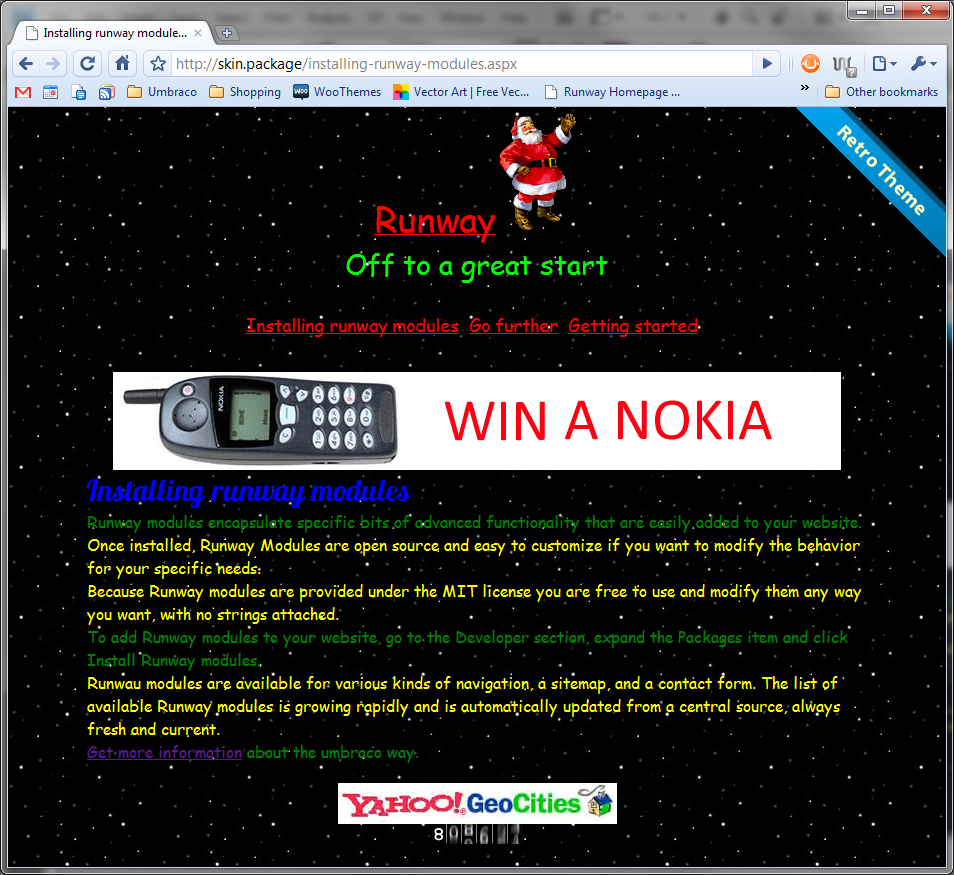
This is a simple package that installs the "Retro" theme for Runway, which won the Skin/Theme competition at the Umbraco conference "CodeGarden10"
For this package to work you must have Runway installed.
This package simply replaces the stylesheet that comes with runway and adds a sub directory in the CSS folder called retro-theme which contains the images used for the theme.
Please note this simply overwrites the CSS file that comes with Runway, so when uninstalling this package it removes the runway.css file
The theme was created with CSS and images only and no XHTML markup is modified from the default Runway site.
Some features of the CSS file include:
- CSS :before and :after to insert images into the DOM
- CSS @font-face using google's web fonts - http://code.google.com/webfonts
- CSS webkit animation to animate the background
- CSS nth-child(odd) and nth-child(even) to give the <p> different colours
Install Video
YouTube - http://bit.ly/umbraco-retro-vid
Please note this is NOT a serious theme from me, and is more of a joke however it does show you can achieve ugly theme/skins as well as beautiful ones.
Screenshots

- Package Files
- Documentation
- Archived Files
Package files
Archived files
Documentation
Source code

Package Compatibility
This package is compatible with the following versions as reported by community members who have downloaded this package:
Untested or doesn't work on Umbraco Cloud
Version 8.18.x (untested)
You must login before you can report on package compatibility.
Previously reported to work on versions:
Package Information
- Package owner: Warren Buckley
- Created: 30/06/2010
- Current version 1.0
- License MIT
- Downloads on Our: 1.5K