42 votes
Embedded Content
Are you looking for a way to create content on a node that uses the build-in Umbraco data types, yet let’s the content editor decide how many fields he actually needs? Do you want your content editors to be able to order the fields as they see fit? Are you tired of having to create ‘data’ sub nodes just so you have the data in Xml format for easy transformation? Or are you just looking for a version of the Repeatable Custom Content that works with Umbraco 4.5+?
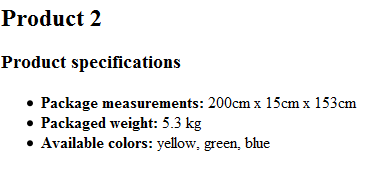
Then it is time to open the curtain for another Umbraco data type grown here at the FARM called Embedded Content (version 1.1). In short it allows you to add content to a node with pretty much the same outcome as if you were using data sub nodes. For example see this implementation of specifications for a product:
- Product
- Product specifications
- Package measurements (value: 200cm x 15cm x 150cm)
- Package weight (value: 5.3 kg)
- Available colors (value: yellow, red, blue)
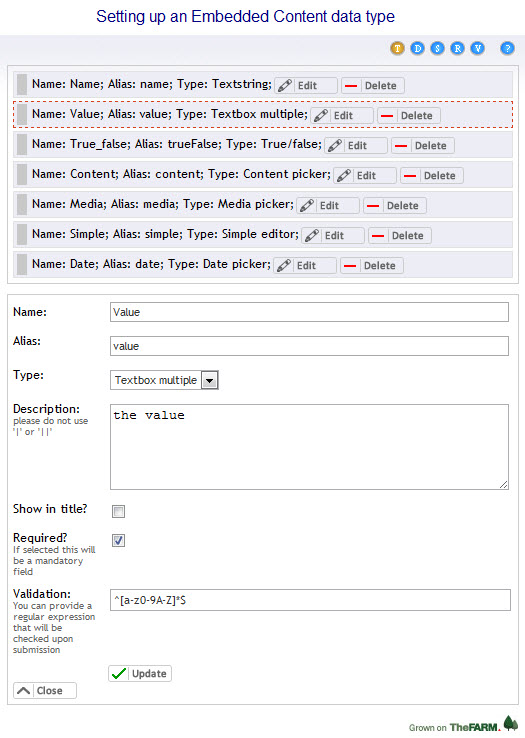
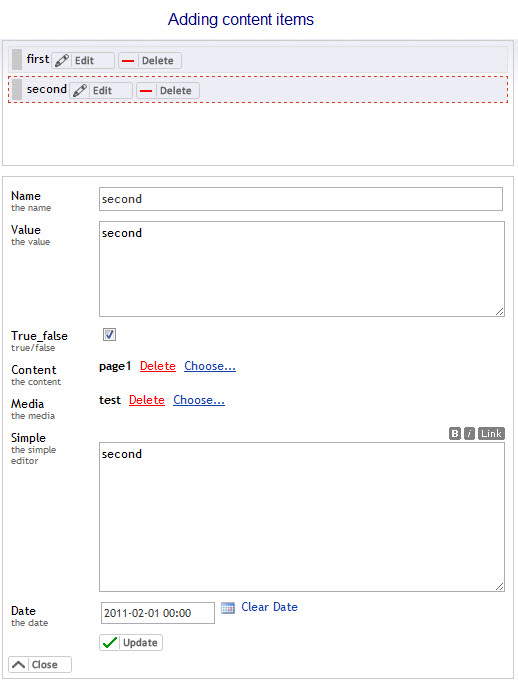
Pretty much the same can be achieved with the Embedded Content data type by creating a new instance of it, adding 2 properties ‘name’ and ‘value’ to it and adding it to the product node. You will then be able to add as many ‘name-value-pairs’ as you like to the control (as you are able to create as many sub nodes as you want) and sort them to your liking (again same as with the sub nodes). Yet it is all embedded in the product node and it gets all saved as Xml in the backend. You can use a range of basic Umbraco data types for the Embedded Content properties, at the moment these are
Textstring
Textbox multiple
True/false
Content picker
Media picker
Simple editor
Date picker
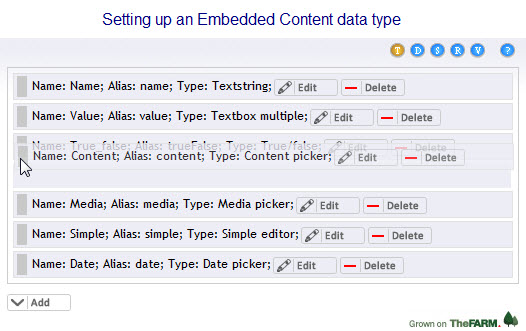
After installing the package you will first have to create a new data type with a name of your choice, and then set it to use to 'Embedded Content'. After saving you will be able to add custom properties to the datatype, you can also edit, delete or re-order them.
Here is a quick overview of the individual options when creating a new property:
Name: the name of the property, just for the editor
Alias: this is the name of the Xml node when data for this schema gets saved (see below for an example)
Type: the type of this property
Description: a short description for the purposes of the editor
Show in title? if ticked then this property will be displayed in the content list which the content editor sees
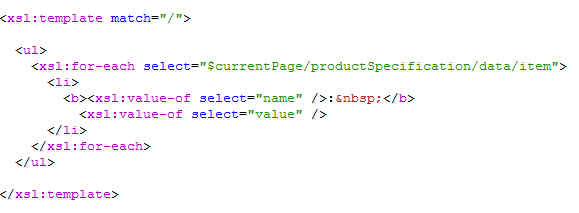
After you have create a new Embedded Content data type you can place it on a document type and add content to it on a content node. The data will be saved as Xml, here is an example:
<productSpecification>
<data>
<item id="1">
<name propertyid="1">Package measurements</name>
<value propertyid="2">200cm x 15cm x 150cm</value>
<mediaItem propertyid="3" />
<contentItem propertyid="4" />
<validFrom propertyid="5" />
</item>
<item id="2">
<name propertyid="1">Packaged weight</name>
<value propertyid="2">5.3</value>
<mediaItem propertyid="3" />
<contentItem propertyid="4" />
<validFrom propertyid="5" />
</item>
<item id="3">
<name propertyid="1">Available colors</name>
<value propertyid="2">yellow, green, blue</value>
<mediaItem propertyid="3">1062</mediaItem>
<contentItem propertyid="4">1065</contentItem>
<validFrom propertyid="5">2011-01-14 00:00</validFrom>
</item>
</data>
</productSpecification>
In conclusion this is a really flexible and and highly customizable data type which allows you to quickly add a complex type (so to speak) to a content node, giving the content editor as much flexibility as possible concerning the number of items and ordering. As such I am sure it will come in handy for a broad range of tasks and I am really pleased that we can make this data type available for everyone working with Umbraco. Enjoy!
This package has been developed using Umbraco v. 4.6.1. It hasn't been tested on 4.0.* or 4.5.* yet I see no reason why it wouldn't run on these versions.
-----------------------------------------------------------------------------
ONLY REQUIRED FOR VERSION 1.2 AND EARLIER
-----------------------------------------------------------------------------
If you want to install this package manually you will need to add the following to your web.config file:
<configuration>
<!-- for IIS6 -->
<system.web>
<httpHandlers>
<add path="umbraco/REST/umbraconodename" verb="*" type="TheFarm.Umbraco.EmbeddedContent.UmbracoNodeNameHandler, TheFarm.Umbraco.EmbeddedContent" validate="true" />
</httpHandlers>
</system.web>
<!-- for IIS 7 -->
<system.webServer>
<handlers>
<remove name="UmbracoNodeName" />
<add name="UmbracoNodeName" path="umbraco/REST/umbraconodename" verb="*" type="TheFarm.Umbraco.EmbeddedContent.UmbracoNodeNameHandler, TheFarm.Umbraco.EmbeddedContent" preCondition="integratedMode" />
</handlers>
</system.webServer>
</configuration>
Change log
Update v 1.2.4
Changed Media Picker and Content Pickers to show the linked item name instead of the ID. This also adds a link to view the selected media item and a tooltip to show the document's location in the tree - thanks Jeremy Pyne!
Added support for the property editor mandatory checkbox to work, requiring at least 1 item to be added. Updated the javascript regex to allow regexes to be optional (unless required is checked) - thanks to Matt Brailsford!
Update v 1.2.3
Removed protocol from reference to Google CDN so works without browser warning/block when back-office accessed via SSL - thanks to Andy Butland
Update v 1.2.2
Fixed a bug when multiple Embedded Content controls were on the same document type the maxCount was set globally - thanks to Derrik Engel
Update v 1.2.1
Fixed sort issue in Chrome
Removed dependancy for custom service in favor of the Umbraco web services
No longer requires Web.Config updates
Update v 1.2
Removed dependency of HttpContext when calling MapPath. Change attr() because of jQuery 1.6 in 4.7.1. Change 'required' to 'require' because Chrome misinterprets it.
Update v 1.1.3
Fixed a bug where the correct value wasn't read when adding a new content item.
Update v 1.1.2
A couple of bug fixes, most notably when another control on the page does a post back. Added 'max number of items' field which let's you limit the number of content items (credits go to Matt Brailsford for the idea).
Update v 1.1.1
Bug fixes:
- special characters in textstring and textbox multiple
- fixed error message when saving a content node with an empty Embedded Content control
- fixed error after re-ordering items with special characters
Additionally the first element in the add box will now be selected when clicking on 'add' or 'edit'.
Update v 1.1
Couple of bug fixes, a new prevalue schema, VALIDATION and a lot of VISUAL IMPROVEMENTS :)
Update v 1.09
Added a backup web service in case the node name handler doesn't work
Update v 1.08
Fixed 2 issues with the content editor (thanks Keith!)
Update v 1.07
Added html encoding to the description field (thanks James!) and fixed an issue where aliases where all lowercased when re-ordering (thanks Michael!)
Update v 1.06
Completed JS refactoring, upgraded jquery.dragsort library to fix IE issues
Update v 1.05
Data from the simple editor will now be saved in a CDATA section.
Update v 1.04
Fixed a bug when deleting an item from the list and compiled against .Net 3.5 so it runs with this framework as well!
Update v 1.03:
Fixed a bug that occured with 2 of the same data types on one doc type and implemented graphical improvements (credits to Petr Snobelt! for the idea)
Update v 1.02:
Added delete confirmations for both content and prevalue editor (cheers Lee!)
Update v 1.01:
Added the showLabel property to the control which works pretty much like the same function on the WYSIWYG datatype (credits for the idea go to Petr Snobelt!); fixed a couple of bugs found by Lefteris
Screenshots


- Package Files
- Documentation
- Archived Files
Package files
Archived files
-
Embedded_Content_1.1.zipuploaded 14/02/2011 by Sascha Wolter
For Umbraco: & .NET Version: -
Embedded_Content_1.1.1.zipuploaded 28/02/2011 by Sascha Wolter
For Umbraco: & .NET Version: -
Embedded_Content_1.08.zipuploaded 01/03/2011 by Sascha Wolter
For Umbraco: & .NET Version: -
Embedded_Content_1.1.2.zipuploaded 21/03/2011 by Sascha Wolter
For Umbraco: & .NET Version: -
Embedded_Content_1.1.3.zipuploaded 21/03/2011 by Sascha Wolter
For Umbraco: & .NET Version: 4.0 -
Embedded_Content_1.2.zipuploaded 03/07/2012 by Bo Kingo Damgaard
For Umbraco: & .NET Version: 4.0 -
Embedded_Content_1.2.1.zipuploaded 02/11/2012 by Peter Gregory
For Umbraco: & .NET Version: 4.0 -
Embedded_Content_1.2.2.zipuploaded 23/11/2012 by Jeavon Leopold
For Umbraco: & .NET Version: 4.0 -
Embedded_Content_1.2.3.zipuploaded 11/03/2013 by Jeavon Leopold
For Umbraco: & .NET Version: 4.0
Documentation
Source code
Package owner

Package Compatibility
This package is compatible with the following versions as reported by community members who have downloaded this package:
Untested or doesn't work on Umbraco Cloud
Version 8.18.x (untested)
You must login before you can report on package compatibility.
Previously reported to work on versions:
Package Information
- Package owner: Sascha Wolter
- Contributors: Peter Gregory , Matt Brailsford , Jeavon Leopold , Jeppe Vammen Kristensen , Bo Kingo Damgaard , Drew , Steven Newstead
- Created: 20/01/2011
- Current version 1.2.4
- License Microsoft Public License (Ms-PL)
- Downloads on Our: 12.3K